
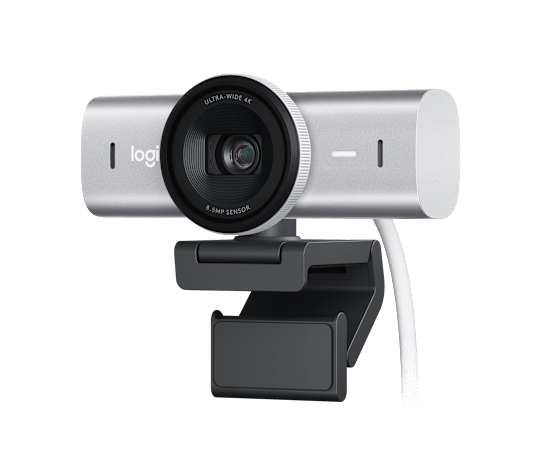
Reliable technology is crucial for productive hybrid work, secure business operations, and consistent content creation, and today’s roundup keeps the marathon moving with practical remote IT support guidance, cybersecurity reminders, system optimization wins, and a closer look at the premium Logitech MX Brio 4K webcam; Microsoft Quick Assist remains one of the most useful tools for resolving Windows issues without an on-site visit, allowing trusted technical support to review settings, troubleshoot drivers, optimize webcam performance, and address software problems through a secure connection, while the strongest results come from verifying the helper’s identity through a separate communication channel, closing sensitive documents before screen sharing, avoiding password entry during remote control, and ending the session immediately when anything appears unusual; NetworkRepair1’s Remote Services page provides the official Quick Assist workflow, including opening the application, entering the security code supplied by the support professional, reviewing the permission request, and approving screen viewing or control, creating a faster path from frustrating computer trouble to a working system without the classic “have you tried turning it off and on again” routine; cybersecurity remains equally crucial, so updated operating systems, current browsers, protected Microsoft 365 accounts, multifactor authentication, least-privilege access, reputable security software, encrypted backups, and carefully reviewed camera and microphone permissions can significantly reduce exposure while preserving productivity, and the MX Brio adds a helpful physical privacy shutter that blocks the lens independently of software settings, giving hybrid workers one more practical layer of protection between meetings; system optimization also delivers immediate value, beginning with a direct USB-C connection and sufficient USB bandwidth for high-resolution video, selecting 1080p at 60 frames per second when smooth meetings and efficient bandwidth matter most, choosing 4K at 30 frames per second when recorded tutorials and product demonstrations benefit from extra detail, closing unnecessary CPU-heavy applications before streaming or recording, updating Logitech software and conferencing applications, and improving front-facing lighting so the camera does not have to perform digital gymnastics in a dim room; the Logitech MX Brio earns its premium positioning through UHD 4K video, 1080p at 60fps, a large high-performance sensor, AI-assisted image enhancement, automatic exposure, automatic white balance, image noise reduction, selectable framing, integrated dual beamforming microphones, and a solid aluminum design that looks more professional than a plastic rectangle perched on a monitor; its low-light and backlit performance can keep facial detail visible, its microphone system can reduce background noise for everyday calls, and its physical privacy shutter provides a fast, satisfying close-the-camera moment when the meeting ends; Show Mode expands the webcam beyond standard face-to-face meetings by supporting desk demonstrations, notes, sketches, product details, and overhead-style presentations, which makes the device especially appealing to educators, consultants, reviewers, online sellers, and small businesses that need flexible visual communication without building a full studio; Logitech’s Fine Controls through supported software provide additional adjustment for lighting, white balance, ISO, shutter speed, tint, vibrance, and other image settings, giving creators more control when automatic modes need a little professional supervision; the review is not complete without acknowledging the trade-offs, because 4K is limited to 30fps, serious filmmakers and advanced streamers may still prefer a mirrorless camera with interchangeable lenses and deeper control, and some workflows may reveal sharpening or processing that looks more polished in a meeting than in a cinematic production, but for hybrid work, video calls, product tutorials, live demonstrations, casual streaming, and professional remote collaboration, the MX Brio is a strong all-rounder that can improve clarity without demanding a complicated camera rig; content quality also depends on what happens after the camera is mounted, and NetworkRepair1 helps Shopify and Amazon sellers transform product features into polished video assets that explain benefits, demonstrate operation, strengthen listing confidence, and give customers a clearer reason to click, making a professionally produced product review, tutorial, short-form clip, or branded demonstration a valuable extension of an ecommerce strategy; businesses can explore the NetworkRepair1 collaboration and sponsorship page to discover how detailed reviews, product features, tutorials, and social media campaigns can create meaningful exposure across digital platforms, while the NetworkRepair1 video library shows the channel’s focus on practical technology, tools, electronics, and product-focused storytelling; the NetworkRepair1 YouTube community has now reached 13,000 subscribers and more than 1.1 million lifetime views, providing social proof that useful reviews and clear demonstrations can build an engaged audience over time, and that momentum supports a broader mission of helping individuals and small businesses stay connected, protected, productive, and visible; the daily takeaway is simple, secure remote support reduces downtime, disciplined cybersecurity protects momentum, system optimization improves the experience, and the right webcam can upgrade both professional communication and product presentation, creating a smarter technology setup with more room to work, create, promote, and grow.


🚀 Let’s Collaborate
- 🚀 Product video services: Showcase products with polished reviews, tutorials, demos, and social content.
- 🛒 Shopify and Amazon promotion: Turn product features into engaging video assets that can boost visibility and buyer confidence.
- 🎥 Trusted audience: Reach a growing technology community backed by 13,000 YouTube subscribers and 1.1 million lifetime views.
- 🤝 Let’s collaborate: Build meaningful campaigns together and expand your brand presence.
🛍️ Upgrade the Setup
Ready to upgrade your tech? Check out our curated list of essential tools to keep you connected and productive.
Items are featured on the YouTube channel: Amazon Store
📲 Stay Connected
💻 Remote IT Support
- 🛠️ Microsoft Quick Assist: Secure remote troubleshooting for computers, software, and connectivity.
- 🔐 Cybersecurity support: Strengthen system protection, account security, and device privacy.
- ⚙️ System optimization: Improve performance, stability, and productivity without an on-site visit.
📩 Contact
805-723-9608
oq@networkrepair1.com