
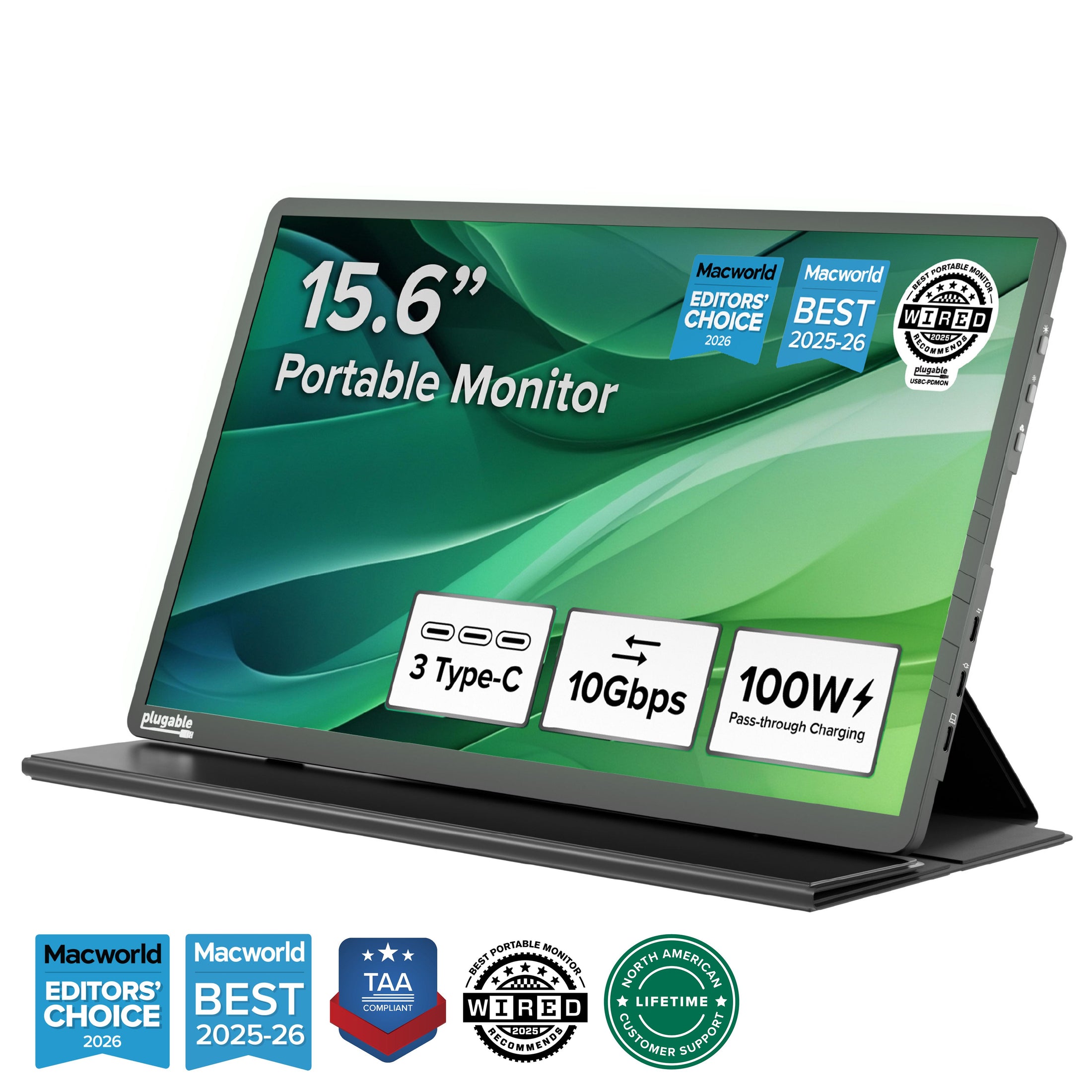
The marathon continues, and today’s home office upgrade theme is simple: expand productivity, protect every connection, and eliminate the cable chaos before it starts. Microsoft Quick Assist remains a powerful tool for legitimate remote IT support, but security comes first, so only accept a session after independently verifying the helper, confirming that the support request began through a trusted channel, and reviewing every permission prompt before allowing screen sharing or full control. Microsoft specifically advises using Quick Assist only with trusted people or support interactions initiated by the customer, which makes unsolicited calls, alarming pop-ups, rushed requests, and surprise “Microsoft Support” messages immediate red flags. End the session with Leave when the task is complete, cancel full control when it is no longer required, and never provide passwords, banking details, authentication codes, or unrestricted access during a troubleshooting session. NetworkRepair1 provides remote IT support built around secure troubleshooting, system diagnostics, Microsoft 365 assistance, malware removal, and practical guidance that keeps home offices productive without turning a minor computer problem into a security incident. Cybersecurity remains the other half of the remote-work equation, so keep Windows, browsers, Microsoft 365 applications, firmware, endpoint protection, and router software current, maintain multi-factor authentication, use separate standard user accounts for everyday work, review suspicious email links before opening them, and preserve reliable backups for important business files. System optimization also earns a place on today’s checklist, because startup applications, unnecessary browser extensions, low storage capacity, outdated graphics drivers, overloaded background processes, and weak Wi-Fi placement can quietly drain performance long before a laptop officially complains. A stable wired Ethernet connection can improve video meetings and large file transfers, while a clean desktop, sensible power settings, and updated drivers can make the entire setup feel faster without buying a new computer. The featured electronics pick for this roundup is the Plugable USB-C Portable Monitor with Protective Case/Stand, a 15.6-inch Full HD IPS display that doubles as a compact USB-C hub, and it is one of the more thoughtful home office upgrades for 2026 because it adds screen space without demanding a permanent desk installation. The monitor supports a 1920×1080 resolution at 60Hz, a 178-degree viewing angle, anti-glare treatment, brightness up to 300 nits, two USB-C 10Gbps downstream ports, and 100W USB-C Power Delivery pass-through with up to 85W available for the host laptop when connected to a compatible charger. That combination turns one portable display into a second workspace, accessory connection point, and charging bridge, which is particularly useful for remote support sessions, email management, project dashboards, content review, and video production workflows.  The folding protective cover becomes the stand, the profile measures approximately 0.4 inches, and the weight stays around 1.85 pounds, so the monitor can move from a home desk to a travel bag without requiring a moving truck or an emotional support dolly. Compatibility covers Windows, macOS, ChromeOS, iPad, iPhone, and Android devices equipped with a full-featured, video-capable USB-C, USB4, or Thunderbolt port, but the important technical detail is DisplayPort Alt Mode support, because a USB-C connector alone does not guarantee video output. The monitor does not include a built-in battery, touchscreen, or speakers, so the best experience comes from pairing it with the correct host port, certified USB-C cable, and suitable external charger when the laptop or mobile device cannot provide enough power. For buyers who need more ports than the monitor provides, the Anker 555 USB-C Hub remains a strong all-purpose option, delivering eight-in-one expansion with HDMI output up to 4K at 60Hz, Gigabit Ethernet, SD and microSD card readers, two USB-A 10Gbps ports, one USB-C 10Gbps data port, and up to 100W input with approximately 85W passed to the laptop.
  Its wired networking option makes it especially appealing for remote workers who want dependable connectivity during support calls, cloud administration, large uploads, or Microsoft Teams meetings, while its compact aluminum design keeps the desk from becoming a museum exhibit dedicated to adapters. The Plugable USB-C 7-in-1 Hub offers another practical path with HDMI, three USB-A 3.0 ports, SD and microSD card readers, and up to 100W pass-through charging with up to 92W available to the host, making it a useful choice for laptops that still need USB-A accessories and memory-card access. For shoppers who prioritize Gigabit Ethernet, the Plugable USB-C 7-in-1 Ethernet Hub expands the same travel-friendly concept with wired networking, while the UGREEN Revodok Pro 7-in-1 Hub adds 10Gbps connectivity, Gigabit Ethernet, DisplayPort output up to 4K at 60Hz, and up to 85W laptop charging through its 100W PD input.
  The buying decision is straightforward: choose the Plugable monitor when a portable second display and integrated USB-C expansion matter most, choose Anker when HDMI, Ethernet, card readers, and high-speed data need to share one compact hub, choose Plugable’s Ethernet hub when reliability and driver-free connectivity are central, and choose UGREEN when DisplayPort, 10Gbps performance, and a flexible mobile workstation matter more than a small footprint alone. Before purchasing, confirm the laptop’s USB-C capabilities, check whether the port supports video and Power Delivery, verify the required display connector, and match the hub’s power budget to the laptop’s charger. These upgrades can transform a single-laptop workspace into a cleaner multi-screen command center, but good hardware works best alongside strong IT hygiene, secure remote support habits, current software, and a network designed for consistent performance. The NetworkRepair1 community is also celebrating a major milestone with 13,000 YouTube subscribers and more than 1.1 million lifetime views, proof that useful technology education, honest product coverage, and practical troubleshooting can build meaningful momentum. That audience growth supports the next part of the NetworkRepair1 mission: helping Amazon sellers and Shopify brands create professional product videos that explain features, demonstrate real use cases, strengthen storefront presentation, and give customers a clearer reason to buy. From Amazon listing videos and product demonstrations to Shopify storefront content, tutorials, social clips, and branded campaigns, NetworkRepair1’s media services can help businesses boost visibility, enhance credibility, and expand their digital presence, while the Amazon-versus-Shopify product video guide provides additional context for platform-specific content strategy. The marathon continues with better equipment, safer systems, stronger content, and more productive workdays, creating a home office foundation that can support meaningful growth through 2026 and beyond.
🚀 Promote With Network Repair1
- 🎥 Product Video Services: Professional videos for Amazon listings and Shopify storefronts.
- 💻 Remote IT Support: Secure troubleshooting, Microsoft 365 assistance, and system optimization.
- 🛡️ Cybersecurity Assistance: Malware removal, phishing guidance, account protection, and network diagnostics.
- 📈 Media Growth: Product reviews, tutorials, social clips, and brand storytelling.
- 🤝 Let’s collaborate: Work with us to boost visibility, strengthen trust, and grow together.
📺 YouTube
🎵 TikTok
📸 Instagram
📘 Facebook
Loved today's review? You can find this product and all our top picks on our official Amazon storefront.
These items are featured on the YouTube channel:
https://www.amazon.com/shop/networkrepair1?ref_=cm_sw_r_cp_ud_aipsfshop_XV0ER95A5EVVJDPA7W6A_1
📞 805-723-9608
Leave a Reply